---
title: Add Compensation to Jobs
description: Follow this guide to learn how to add compensation to new or open jobs, as well as enable listing the salary on job boards.
---
[Skip to content](https://learn.talentcare.com/knowledge/add-compensation-to-jobs#main-content)
English
Show submenu for translations
[Submit a Support Ticket](https://learn.talentcare.com/knowledge/kb-tickets/new?hsLang=en)

- [Support Ticket](https://learn.talentcare.com/knowledge/kb-tickets/new)
- [Go to Knowledge Base](https://learn.talentcare.com/knowledge)
- [Sign out](https://learn.talentcare.com/_hcms/mem/logout)
Open main navigation
Close main navigation
- [Support Ticket](https://learn.talentcare.com/knowledge/kb-tickets/new)
- [Go to Knowledge Base](https://learn.talentcare.com/knowledge)
- [Sign out](https://learn.talentcare.com/_hcms/mem/logout)
- English
Show submenu for translations
- [Submit a Support Ticket](https://learn.talentcare.com/knowledge/kb-tickets/new)
- Visit Talentcare
Visit Talentcare
Hello. How can we help you?
- There are no suggestions because the search field is empty.
1. [Knowledge Base](https://learn.talentcare.com/knowledge?hsLang=en)
2. [Open and Manage Jobs](https://learn.talentcare.com/knowledge/open-and-manage-jobs?hsLang=en)
3. [Jobs](https://learn.talentcare.com/knowledge/open-and-manage-jobs?hsLang=en#jobs)
# Add Compensation to Jobs
## Follow this guide to learn how to add compensation to new or open jobs, as well as enable listing the salary on job boards.
### Table of Contents
- [**Add Compensation to a Job**](https://learn.talentcare.com/knowledge/add-compensation-to-jobs#add-comp)
- [**Add to an Open Job or Job Template**](https://learn.talentcare.com/knowledge/add-compensation-to-jobs#open-temp)
- [**Add to a New Job**](https://learn.talentcare.com/knowledge/add-compensation-to-jobs#new)
- [**List Compensation on Job Boards**](https://learn.talentcare.com/knowledge/add-compensation-to-jobs#list-comp)
- [**From an Open Job**](https://learn.talentcare.com/knowledge/add-compensation-to-jobs#list-open)
- [**From a Job Template**](https://learn.talentcare.com/knowledge/add-compensation-to-jobs#list-temp)
### Add Compensation to a Job
Adding compensation for a job can be done at three distinct stages: When opening a new job, when editing an open, individual job, or at the job template level.
#### Add to an Open Job or Job Template
- Proceed to your open job or job template
Not sure how to edit a job template? Learn more here: [**Edit Job Templates - Details Tab**](https://learn.talentcare.com/knowledge/edit-job-templates-details-tab?hsLang=en)
- Click on the *Details *tab, then select the *Template Info* tab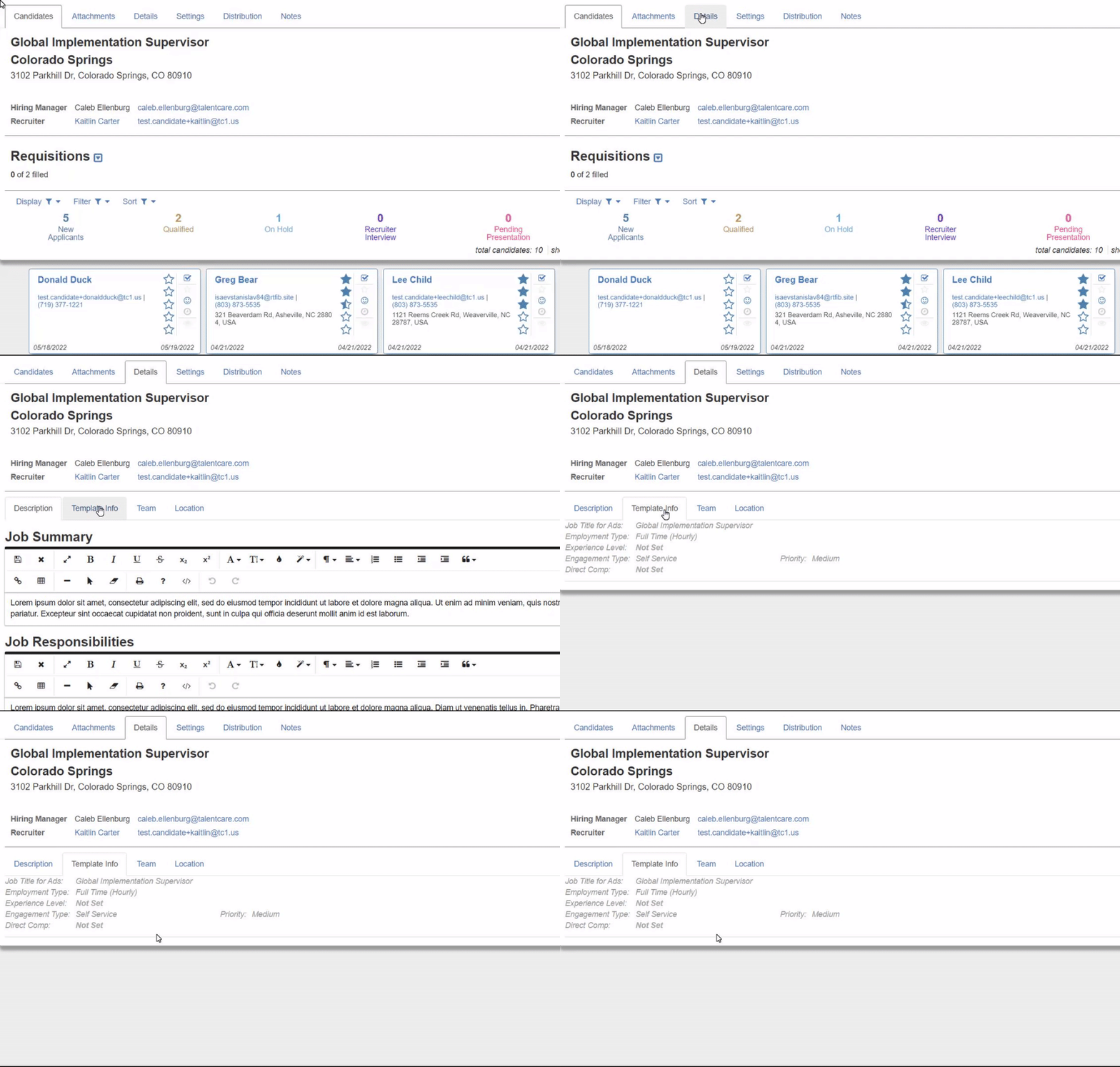
- In the *Direct Comp: *field, click **Not Set**, then enter a minimum and maximum amount for the compensation range of your job
- Click the **Blue Check** button to confirm your compensation
- If you'd like to switch between pay period type, edit the *Employment Type: *field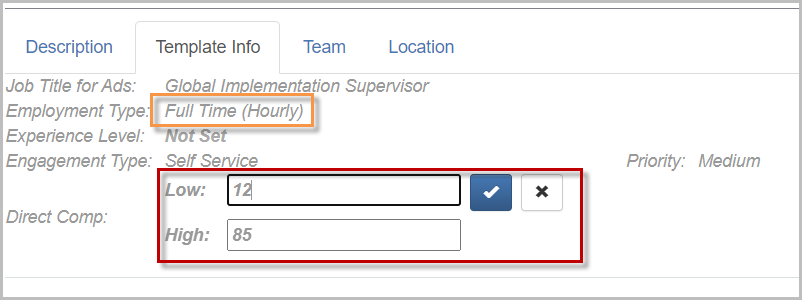
- Your changes should be saved automatically in your job. If editing a job template, click **Finished Editing **when finished
#### Add to a New Job
- Begin the process of opening a new job
Learn more about opening a new job here: **[Open a New Job](https://learn.talentcare.com/knowledge/submit-a-job-requisition?hsLang=en)**
- In the *Job Details* section of the new job form, enter your minimum and maximum range for compensation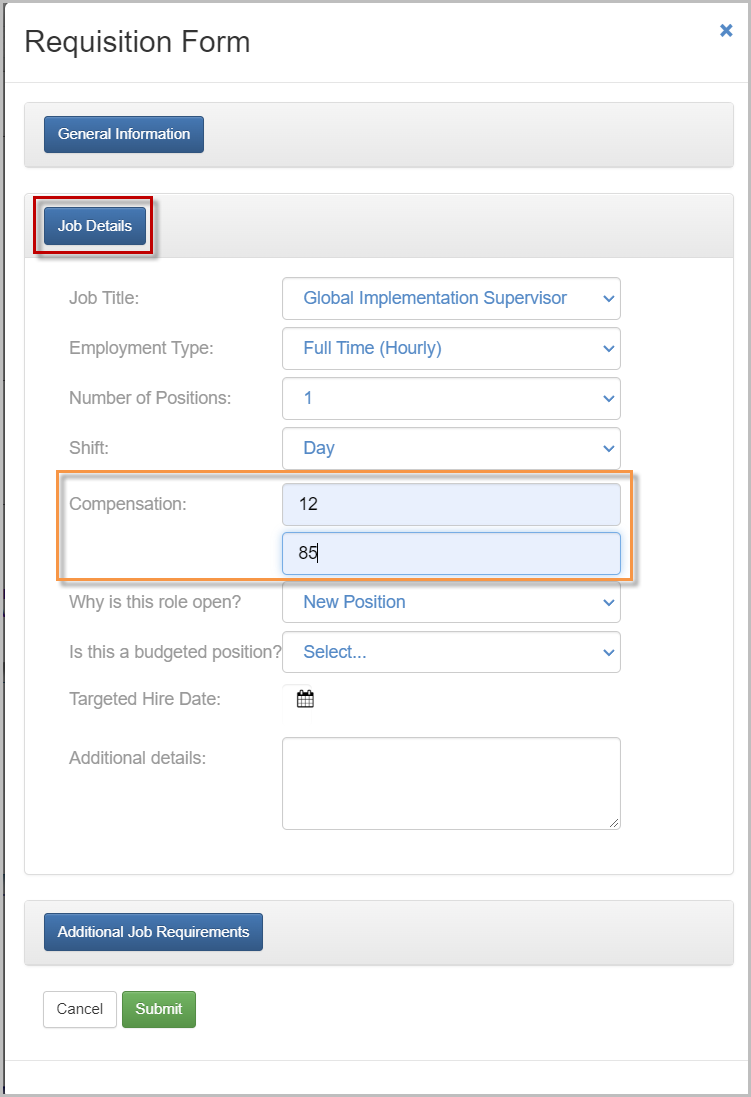
- Click **Submit **once your new job form is completely filled out
### List Compensation on Job Boards
If you are using a job board to post job ads, such as Indeed, follow the steps below to ensure your salary is listed.
#### From an Open Job
- Proceed to the open job you are advertising on a job board
- Click on the *Distribution *tab, then select the *Free Job Boards *tab
- Locate the job board you are posting on, and click **Salary Hidden** to add the salary to the job board
- Once the **Salary Hidden **button changes to **Salary Listed**, your job ads will have compensation information listed on the job board 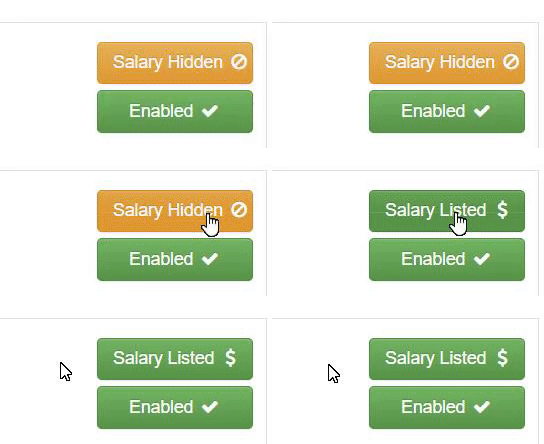
#### From a Job Template
- Proceed to the job template that is used for posting jobs to job boards
- Click the *Advertising *tab
- Locate the job board you are using to post job ads, and click **Salary Hidden**
- Once the **Salary Hidden **button changes to **Salary Listed**, your job ads will have compensation information listed on the job board 
- Click **Finished Editing **when finished
For questions, comments, or issues, **[please contact us!](https://learn.talentcare.com/knowledge/kb-tickets/new?hsLang=en)**
- [Platform Setup and Navigation](https://learn.talentcare.com/knowledge/platform-setup-and-navigation?hsLang=en#main-content)
- [Account Setup](https://learn.talentcare.com/knowledge/platform-setup-and-navigation?hsLang=en#account-setup)
- [ATS Features and Navigation](https://learn.talentcare.com/knowledge/platform-setup-and-navigation?hsLang=en#ats-features-and-navigation)
- [User Management](https://learn.talentcare.com/knowledge/platform-setup-and-navigation?hsLang=en#user-management)
- [Knowledge Base and Helpdesk Support](https://learn.talentcare.com/knowledge/platform-setup-and-navigation?hsLang=en#knowledge-base-and-helpdesk-support)
- [Open and Manage Jobs](https://learn.talentcare.com/knowledge/open-and-manage-jobs?hsLang=en#main-content)
- [Jobs](https://learn.talentcare.com/knowledge/open-and-manage-jobs?hsLang=en#jobs)
- [Requisitions](https://learn.talentcare.com/knowledge/open-and-manage-jobs?hsLang=en#requisitions)
- [Company](https://learn.talentcare.com/knowledge/open-and-manage-jobs?hsLang=en#company)
- [Candidate Management](https://learn.talentcare.com/knowledge/candidate-management?hsLang=en#main-content)
- [Candidate Experience](https://learn.talentcare.com/knowledge/candidate-management?hsLang=en#candidate-experience)
- [Candidate Engagement](https://learn.talentcare.com/knowledge/candidate-management?hsLang=en#candidate-engagement)
- [Candidate Management](https://learn.talentcare.com/knowledge/candidate-management?hsLang=en#candidate-management)
- [Templates and Hiring Tools](https://learn.talentcare.com/knowledge/templates-and-hiring-tools?hsLang=en#main-content)
- [Job Templates](https://learn.talentcare.com/knowledge/templates-and-hiring-tools?hsLang=en#job-templates)
- [Offer Letters](https://learn.talentcare.com/knowledge/templates-and-hiring-tools?hsLang=en#offer-letters)
- [Screening and Hiring Tools](https://learn.talentcare.com/knowledge/templates-and-hiring-tools?hsLang=en#screening-and-hiring-tools)
- [Third Party Services and Solutions](https://learn.talentcare.com/knowledge/third-party-services-and-solutions?hsLang=en#main-content)
- [Indeed Job Distribution](https://learn.talentcare.com/knowledge/third-party-services-and-solutions?hsLang=en#indeed-job-distribution)
- [Third Party Configuration](https://learn.talentcare.com/knowledge/third-party-services-and-solutions?hsLang=en#third-party-configuration)
- [HRIS Integrations](https://learn.talentcare.com/knowledge/third-party-services-and-solutions?hsLang=en#hris-integrations)
- [Job Data Feed Integrations](https://learn.talentcare.com/knowledge/third-party-services-and-solutions?hsLang=en#job-data-feed-integrations)
- [Other Integrations](https://learn.talentcare.com/knowledge/third-party-services-and-solutions?hsLang=en#other-integrations)
- [Reports](https://learn.talentcare.com/knowledge/reports?hsLang=en#main-content)
- [Getting Started](https://learn.talentcare.com/knowledge/reports?hsLang=en#getting-started)
- [Report Details](https://learn.talentcare.com/knowledge/reports?hsLang=en#report-details)
- [Report Features](https://learn.talentcare.com/knowledge/reports?hsLang=en#report-features)
- [Talentcare Report](https://learn.talentcare.com/knowledge/reports?hsLang=en#talentcare-report)
- [Talentcare SFTP](https://learn.talentcare.com/knowledge/reports?hsLang=en#talentcare-sftp)
- [Recruitment Marketing Management](https://learn.talentcare.com/knowledge/recruitment-marketing-management?hsLang=en#main-content)
- [Job Advertising](https://learn.talentcare.com/knowledge/recruitment-marketing-management?hsLang=en#job-advertising)
- [Employer Branding and Reputation Management](https://learn.talentcare.com/knowledge/employer-branding-and-reputation-management?hsLang=en#main-content)
- [Reputation Management](https://learn.talentcare.com/knowledge/employer-branding-and-reputation-management?hsLang=en#reputation-management)
- [Advanced Features](https://learn.talentcare.com/knowledge/advanced-features?hsLang=en#main-content)
- [Partnership Features](https://learn.talentcare.com/knowledge/advanced-features?hsLang=en#partnership-features)
- [Additional Training](https://learn.talentcare.com/knowledge/additional-training?hsLang=en#main-content)
- [Training Videos](https://learn.talentcare.com/knowledge/additional-training?hsLang=en#training-videos)
[](https://talentcare.com)
Talentcare Knowledge Base
[mailto:email@email.com](mailto:email@email.com)
Copyright © 2026, www.talentcare.com