---
title: Manage your Account Settings
description: This guide details the number of options available to you in your Talentcare Platform Account Settings.
---
[Skip to content](https://learn.talentcare.com/knowledge/manage-your-account-settings#main-content)
English
Show submenu for translations
[Submit a Support Ticket](https://learn.talentcare.com/knowledge/kb-tickets/new?hsLang=en)

- [Support Ticket](https://learn.talentcare.com/knowledge/kb-tickets/new)
- [Go to Knowledge Base](https://learn.talentcare.com/knowledge)
- [Sign out](https://learn.talentcare.com/_hcms/mem/logout)
Open main navigation
Close main navigation
- [Support Ticket](https://learn.talentcare.com/knowledge/kb-tickets/new)
- [Go to Knowledge Base](https://learn.talentcare.com/knowledge)
- [Sign out](https://learn.talentcare.com/_hcms/mem/logout)
- English
Show submenu for translations
- [Submit a Support Ticket](https://learn.talentcare.com/knowledge/kb-tickets/new)
- Visit Talentcare
Visit Talentcare
Hello. How can we help you?
- There are no suggestions because the search field is empty.
1. [Knowledge Base](https://learn.talentcare.com/knowledge?hsLang=en)
2. [Platform Setup and Navigation](https://learn.talentcare.com/knowledge/platform-setup-and-navigation?hsLang=en)
3. [ATS Features and Navigation](https://learn.talentcare.com/knowledge/platform-setup-and-navigation?hsLang=en#ats-features-and-navigation)
# Manage your Account Settings
## This guide details the number of options available to you in your Talentcare Platform Account Settings. This article is applicable to all Tenant users. Intended Article Audience: Recruiter, Hiring Manager, HR Administrator, C-Suite Leadership
### Table of Contents
- [**Navigation**](https://learn.talentcare.com/knowledge/manage-your-account-settings#navigation)
- [**Account**](https://learn.talentcare.com/knowledge/manage-your-account-settings#account)
- [**Account Settings**](https://learn.talentcare.com/knowledge/manage-your-account-settings#acct-settings)
- [**Account Preferences**](https://learn.talentcare.com/knowledge/manage-your-account-settings#acct-pref)
- [**Email Signature**](https://learn.talentcare.com/knowledge/manage-your-account-settings#email-sig)
- [**Change Password**](https://learn.talentcare.com/knowledge/manage-your-account-settings#pwd)
- [**Calendar**](https://learn.talentcare.com/knowledge/manage-your-account-settings#calendar)
- [**Calendar Settings**](https://learn.talentcare.com/knowledge/manage-your-account-settings#calendar-settings)
- [**Working Hours**](https://learn.talentcare.com/knowledge/manage-your-account-settings#work-hours)
- [**Notifications**](https://learn.talentcare.com/knowledge/manage-your-account-settings#notifications)
- [**Online Phone**](https://learn.talentcare.com/knowledge/manage-your-account-settings#online-phone)
Some features may not be available due to your User Type configuration. Please **[contact us](https://learn.talentcare.com/knowledge/kb-tickets/new?hsLang=en)** for questions or issues.
### Navigation
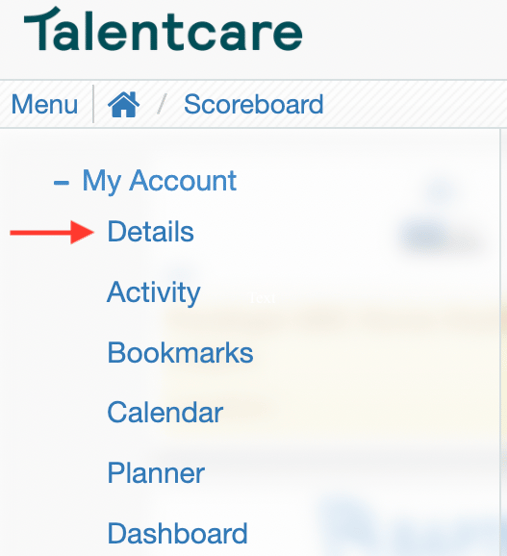
To locate your Account Settings, click Menu\>My Account\>Details
### Account
Under the *Account* tab, you will find settings for your personal Talentcare account.
#### Account Settings
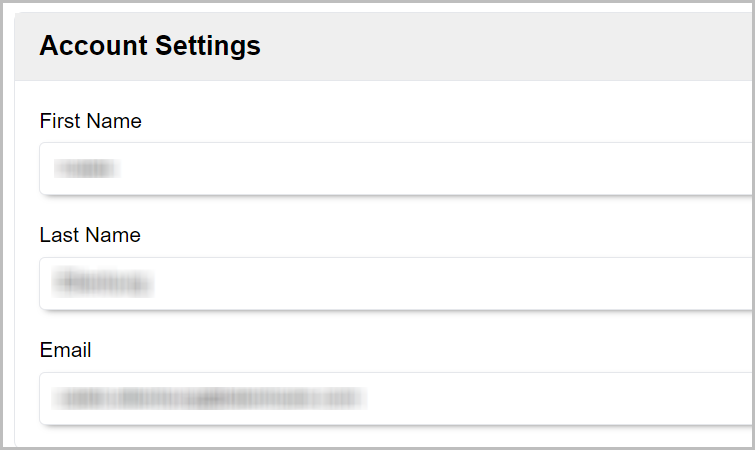
- Here, you can make changes to your name and email address
- To do so, click into the field you'd like to change, make your changes, then click the **Save** button at the bottom of the page
#### Account Preferences
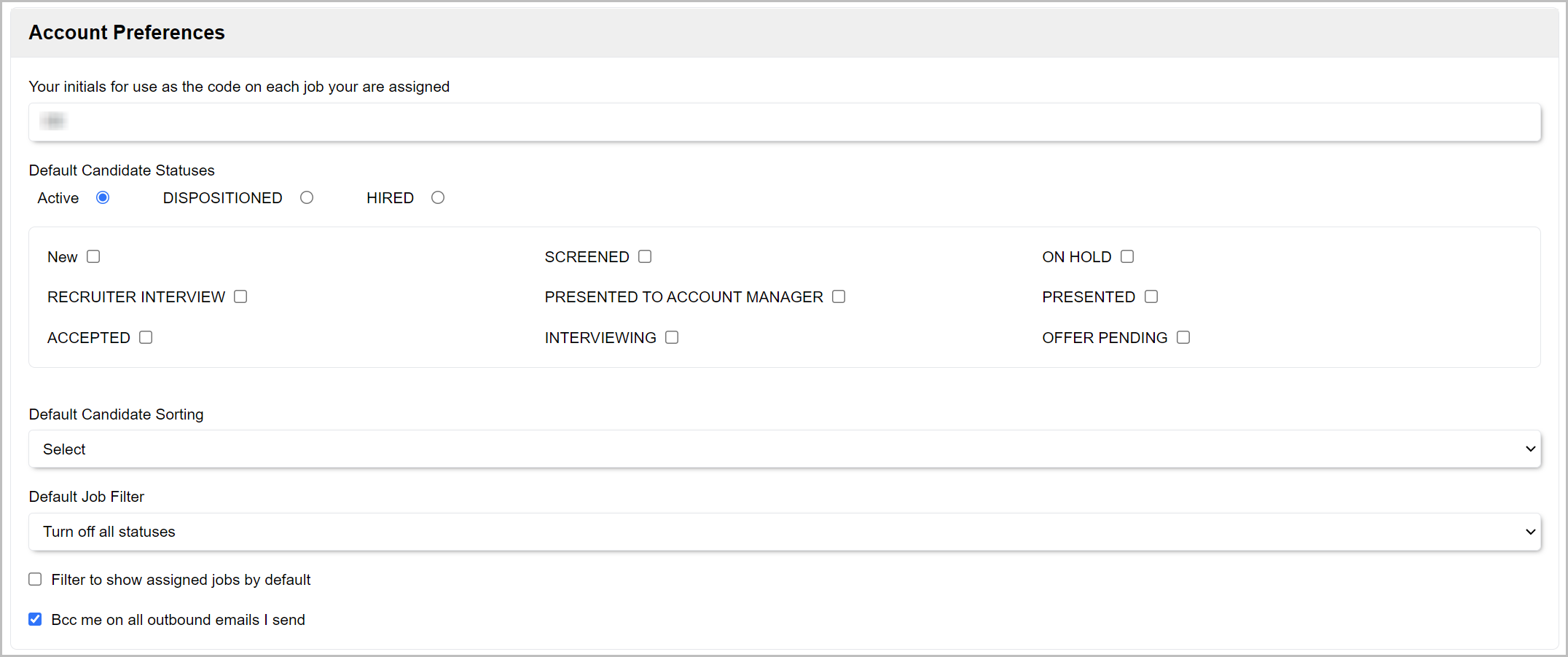
- Under *Account Preferences*, you can change your job code initials. These initials are used as the code for each job you are assigned
- *Default Candidate Status* allows you to change the default status you'd like candidates to be sorted by when viewing an open job. We recommend keeping this set to *Active* to ensure you always see active candidates first
- *Default Candidate Sorting* allows you to sort your candidates by *Status, Application Date, Activity, Rating,* and *Name.* If no order is selected, the default sorts by date and status
- *Default Job Filter* allows you to set a filter when viewing jobs. We recommend leaving this blank to ensure you can see all available jobs
- *Bcc me on all outbound emails I send* - Leave this box checked so that you are blind copied (or BCC'd) on all emails that you send. If you'd like to disable this feature, uncheck the box, then click **Save** at the bottom of the page
#### Email Signature
- Compose your own personal email signature in the text box provided
Learn more about email signatures here: **[Set up E-mail Signature](https://learn.talentcare.com/knowledge/setup-e-mail-signature?hsLang=en)**
#### Change Password
- Need to change your password? Click the **Change Password** button to do so
Learn more about changing your password here: **[Change your Talentcare Account Password](https://learn.talentcare.com/knowledge/change-your-talentcare-password?hsLang=en)**
### Calendar
Click the *Calendar* tab to make changes to your Talentcare calendar settings.
- Add a video conference link to your calendar
- Sync an external calendar
Learn more about using your Talentcare calendar here: **[Use your Talentare Calendar](https://learn.talentcare.com/knowledge/use-the-talentcare-calendar?hsLang=en)**
#### Working Hours
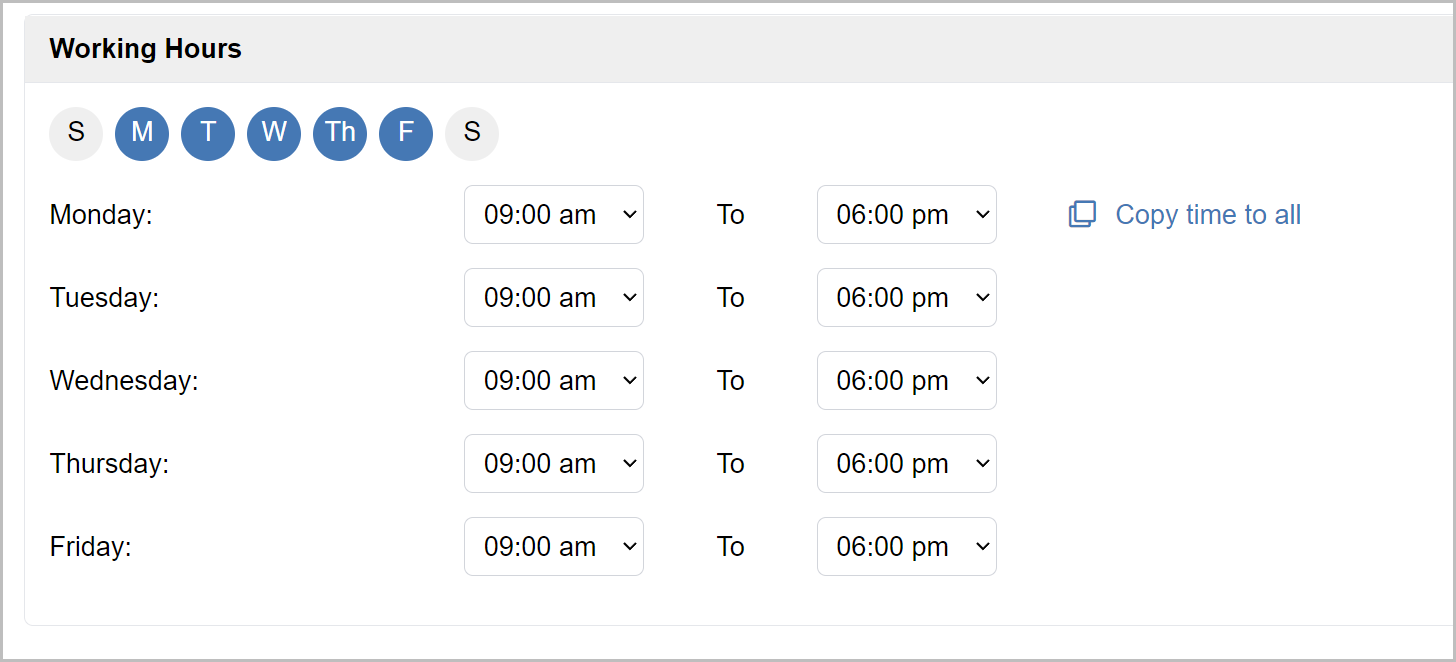
- Use the bubbles at the top of the *Working Hours* section to set your standard daily availability
- Set your standard daily working hours by selecting the appropriate time from the drop-down menus for each day. Alternatively, you can set the first one and click the **Copy time to all** button to quickly set that time for all
### Notifications
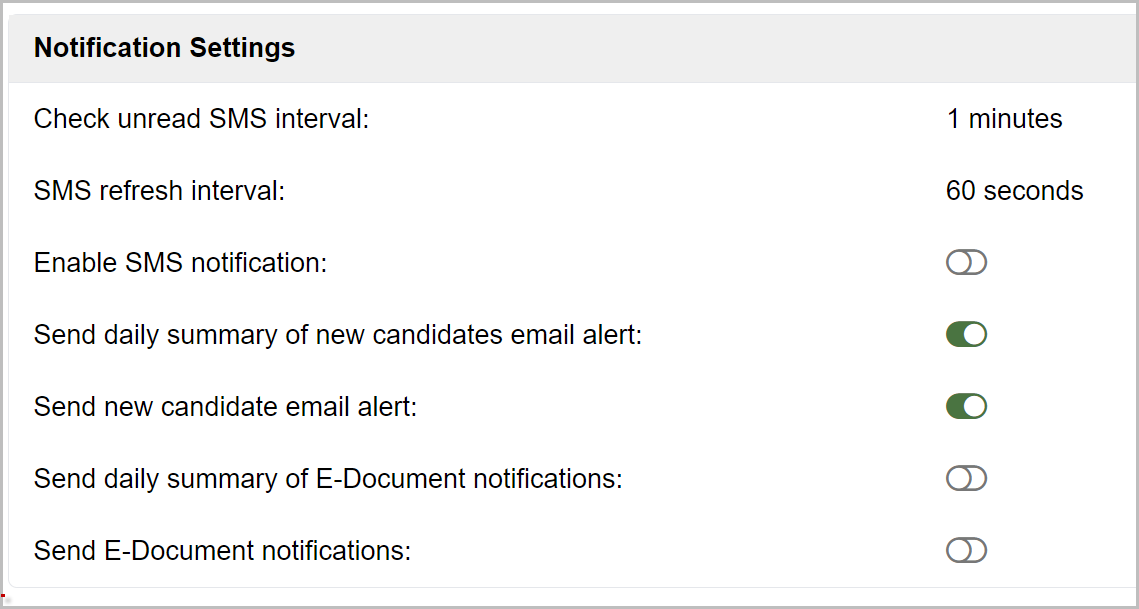
- Change your notification settings under the *Notifications* tab
Learn more about Notification Settings here: **[Online Phone Number Setup and Configuration](https://learn.talentcare.com/knowledge/voip-number-setup-and-configuration?hsLang=en)**
### Online Phone
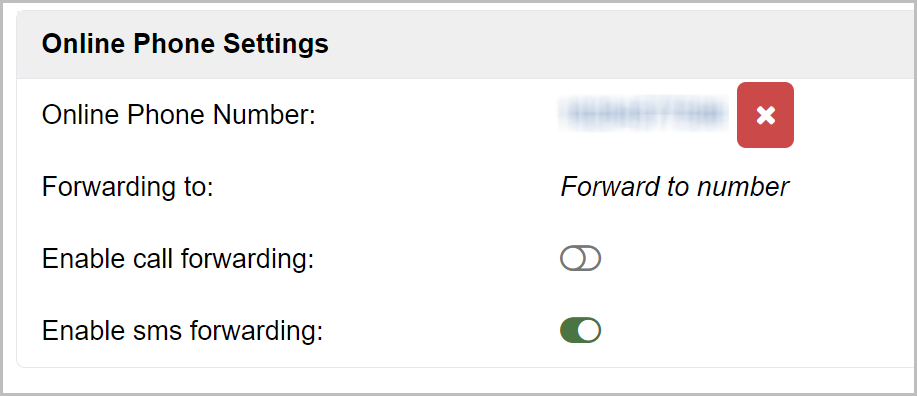
- Manage your online phone, or Online Phone, settings under the *Online Phone* tab
Learn more about Notification Settings here: **[Online Phone Number Setup and Configuration](https://learn.talentcare.com/knowledge/voip-number-setup-and-configuration?hsLang=en)**
For questions, comments, or issues, **[please contact us!](https://learn.talentcare.com/knowledge/kb-tickets/new?hsLang=en)**
---
Was this article helpful? Let us know! [**Submit Feedback**](https://share.hsforms.com/1R4nS7T8rQ0iGUempWRhOsgcj6nq)
---
- [Platform Setup and Navigation](https://learn.talentcare.com/knowledge/platform-setup-and-navigation?hsLang=en#main-content)
- [Account Setup](https://learn.talentcare.com/knowledge/platform-setup-and-navigation?hsLang=en#account-setup)
- [ATS Features and Navigation](https://learn.talentcare.com/knowledge/platform-setup-and-navigation?hsLang=en#ats-features-and-navigation)
- [User Management](https://learn.talentcare.com/knowledge/platform-setup-and-navigation?hsLang=en#user-management)
- [Knowledge Base and Helpdesk Support](https://learn.talentcare.com/knowledge/platform-setup-and-navigation?hsLang=en#knowledge-base-and-helpdesk-support)
- [Open and Manage Jobs](https://learn.talentcare.com/knowledge/open-and-manage-jobs?hsLang=en#main-content)
- [Jobs](https://learn.talentcare.com/knowledge/open-and-manage-jobs?hsLang=en#jobs)
- [Requisitions](https://learn.talentcare.com/knowledge/open-and-manage-jobs?hsLang=en#requisitions)
- [Company](https://learn.talentcare.com/knowledge/open-and-manage-jobs?hsLang=en#company)
- [Candidate Management](https://learn.talentcare.com/knowledge/candidate-management?hsLang=en#main-content)
- [Candidate Experience](https://learn.talentcare.com/knowledge/candidate-management?hsLang=en#candidate-experience)
- [Candidate Engagement](https://learn.talentcare.com/knowledge/candidate-management?hsLang=en#candidate-engagement)
- [Candidate Management](https://learn.talentcare.com/knowledge/candidate-management?hsLang=en#candidate-management)
- [Templates and Hiring Tools](https://learn.talentcare.com/knowledge/templates-and-hiring-tools?hsLang=en#main-content)
- [Job Templates](https://learn.talentcare.com/knowledge/templates-and-hiring-tools?hsLang=en#job-templates)
- [Offer Letters](https://learn.talentcare.com/knowledge/templates-and-hiring-tools?hsLang=en#offer-letters)
- [Screening and Hiring Tools](https://learn.talentcare.com/knowledge/templates-and-hiring-tools?hsLang=en#screening-and-hiring-tools)
- [Third Party Services and Solutions](https://learn.talentcare.com/knowledge/third-party-services-and-solutions?hsLang=en#main-content)
- [Indeed Job Distribution](https://learn.talentcare.com/knowledge/third-party-services-and-solutions?hsLang=en#indeed-job-distribution)
- [Third Party Configuration](https://learn.talentcare.com/knowledge/third-party-services-and-solutions?hsLang=en#third-party-configuration)
- [HRIS Integrations](https://learn.talentcare.com/knowledge/third-party-services-and-solutions?hsLang=en#hris-integrations)
- [Job Data Feed Integrations](https://learn.talentcare.com/knowledge/third-party-services-and-solutions?hsLang=en#job-data-feed-integrations)
- [Other Integrations](https://learn.talentcare.com/knowledge/third-party-services-and-solutions?hsLang=en#other-integrations)
- [Reports](https://learn.talentcare.com/knowledge/reports?hsLang=en#main-content)
- [Getting Started](https://learn.talentcare.com/knowledge/reports?hsLang=en#getting-started)
- [Report Details](https://learn.talentcare.com/knowledge/reports?hsLang=en#report-details)
- [Report Features](https://learn.talentcare.com/knowledge/reports?hsLang=en#report-features)
- [Talentcare Report](https://learn.talentcare.com/knowledge/reports?hsLang=en#talentcare-report)
- [Talentcare SFTP](https://learn.talentcare.com/knowledge/reports?hsLang=en#talentcare-sftp)
- [Recruitment Marketing Management](https://learn.talentcare.com/knowledge/recruitment-marketing-management?hsLang=en#main-content)
- [Job Advertising](https://learn.talentcare.com/knowledge/recruitment-marketing-management?hsLang=en#job-advertising)
- [Employer Branding and Reputation Management](https://learn.talentcare.com/knowledge/employer-branding-and-reputation-management?hsLang=en#main-content)
- [Reputation Management](https://learn.talentcare.com/knowledge/employer-branding-and-reputation-management?hsLang=en#reputation-management)
- [Advanced Features](https://learn.talentcare.com/knowledge/advanced-features?hsLang=en#main-content)
- [Partnership Features](https://learn.talentcare.com/knowledge/advanced-features?hsLang=en#partnership-features)
- [Additional Training](https://learn.talentcare.com/knowledge/additional-training?hsLang=en#main-content)
- [Training Videos](https://learn.talentcare.com/knowledge/additional-training?hsLang=en#training-videos)
[](https://talentcare.com)
Talentcare Knowledge Base
[mailto:email@email.com](mailto:email@email.com)
Copyright © 2026, www.talentcare.com