---
title: Use the Talentcare Calendar
description: The calendar feature allows you to link to external calendars, schedule events and meetings, and block out time slots. Learn how to use the Talentcare calendar below.
---
[Skip to content](https://learn.talentcare.com/knowledge/use-the-talentcare-calendar#main-content)
English
Show submenu for translations
[Submit a Support Ticket](https://learn.talentcare.com/knowledge/kb-tickets/new?hsLang=en)

- [Support Ticket](https://learn.talentcare.com/knowledge/kb-tickets/new)
- [Go to Knowledge Base](https://learn.talentcare.com/knowledge)
- [Sign out](https://learn.talentcare.com/_hcms/mem/logout)
Open main navigation
Close main navigation
- [Support Ticket](https://learn.talentcare.com/knowledge/kb-tickets/new)
- [Go to Knowledge Base](https://learn.talentcare.com/knowledge)
- [Sign out](https://learn.talentcare.com/_hcms/mem/logout)
- English
Show submenu for translations
- [Submit a Support Ticket](https://learn.talentcare.com/knowledge/kb-tickets/new)
- Visit Talentcare
Visit Talentcare
Hello. How can we help you?
- There are no suggestions because the search field is empty.
1. [Knowledge Base](https://learn.talentcare.com/knowledge?hsLang=en)
2. [Platform Setup and Navigation](https://learn.talentcare.com/knowledge/platform-setup-and-navigation?hsLang=en)
3. [ATS Features and Navigation](https://learn.talentcare.com/knowledge/platform-setup-and-navigation?hsLang=en#ats-features-and-navigation)
# Use the Talentcare Calendar
## The calendar feature allows you to link to external calendars, schedule events and meetings, and block out time slots. Learn how to use the Talentcare calendar below.
### Table of Contents
- [**Navigation**](https://learn.talentcare.com/knowledge/use-the-talentcare-calendar#nav)
- [**Using the Calendar**](https://learn.talentcare.com/knowledge/use-the-talentcare-calendar#use)
- [**Create an Event**](https://learn.talentcare.com/knowledge/use-the-talentcare-calendar#create)
- [**Modify an Event**](https://learn.talentcare.com/knowledge/use-the-talentcare-calendar#event)
- [**Sync Now**](https://learn.talentcare.com/knowledge/use-the-talentcare-calendar#sync-now)
- **[Change Calendar View](https://learn.talentcare.com/knowledge/use-the-talentcare-calendar#view)**
- [**Calendar Settings**](https://learn.talentcare.com/knowledge/use-the-talentcare-calendar#settings)
- [**General Calendar Settings**](https://learn.talentcare.com/knowledge/use-the-talentcare-calendar#general)
- [**Video Conference Link**](https://learn.talentcare.com/knowledge/use-the-talentcare-calendar#video)
- [**Self-scheduling feature**](https://learn.talentcare.com/knowledge/use-the-talentcare-calendar#self)
- [**Sync Calendar**](https://learn.talentcare.com/knowledge/use-the-talentcare-calendar#sync)
- [**Working Hours**](https://learn.talentcare.com/knowledge/use-the-talentcare-calendar#working)
### Navigation
Choose one of the methods below to navigate to the calendar.
- Click on the **Calendar icon** in the upper-right side of any page in the ATS
- Navigate from the main menu by selecting *Menu\>My Account\>Calendar*
### Using the Calendar
Learn about the features available to you as you use the calendar.
#### Create an Event
#### 
- Click the **Create** button in the top-left corner of the calendar page
- In the pop-up window, fill out all applicable fields
- Choose the type of item you'd like to create
- Event - A meeting or scheduled event
- Task - Can be a to-do item, a note for a certain date/time, etc.
- Block - Block out a specific date/time interval when your external calendar isn't synced
- Fill in the details of the calendar event
- Provide a description for the event
- Click **Create** when finished
#### Modify an Event
- Locate the event you'd like to modify on your calendar, and select it
- In the pop-up window, select the option that pertains to how you'd like to modify the event
- **Update** - Make changes to the event date/time, location, and description
- **Delete** - Delete the event
- **Close** - Close the window
#### Sync Now

- If an external calendar has been synced with the Talentcare Platform calendar, click the **Sync Now** button to manually sync any updates between the calendars
- Learn more about [**syncing an external calendar**](https://learn.talentcare.com/knowledge/use-the-talentcare-calendar#sync) below
#### Change Calendar View

- To change the calendar view, click the **View** button and select *Day, Week,* or *Month*
### Calendar Settings
Choose one of the methods below to view and modify settings for your calendar, including syncing with external calendars.
- From the Calendar page, click the **Settings** button in the top-right corner
- Navigate from the main menu by selecting *Menu\>My Account\>Account Settings\>Calendar *
#### General Calendar Settings

**Video Conference Link:**
- If you have a perpetual video conferencing link that you'd like to use with your calendar, click *link* to paste your conferencing link
- Click the **Green Check** button to save
**Enable self-scheduling feature:**
- This feature is toggled on by default
- Enabling this feature would allow candidates to schedule an interview time on your calendar
Learn how to set up an interview to allow a candidate to schedule time on your calendar here: **[Schedule an Interview](https://learn.talentcare.com/knowledge/schedule-an-interview?hsLang=en)**
**Sync Calendar:**
- Choose to sync either a Google or Microsoft Outlook calendar with your Talentcare Platform calendar to see events and reminders that have been scheduled on either
Want to sync your external calendar? Learn more about the available options below:
- [**Sync your Google Calendar**](https://learn.talentcare.com/knowledge/sync-your-google-calendar-in-the-talentcare-platform?hsLang=en)
- [**Sync your Microsoft Outlook Calendar**](https://learn.talentcare.com/knowledge/sync-your-microsoft-outlook-calendar?hsLang=en)
#### Working Hours
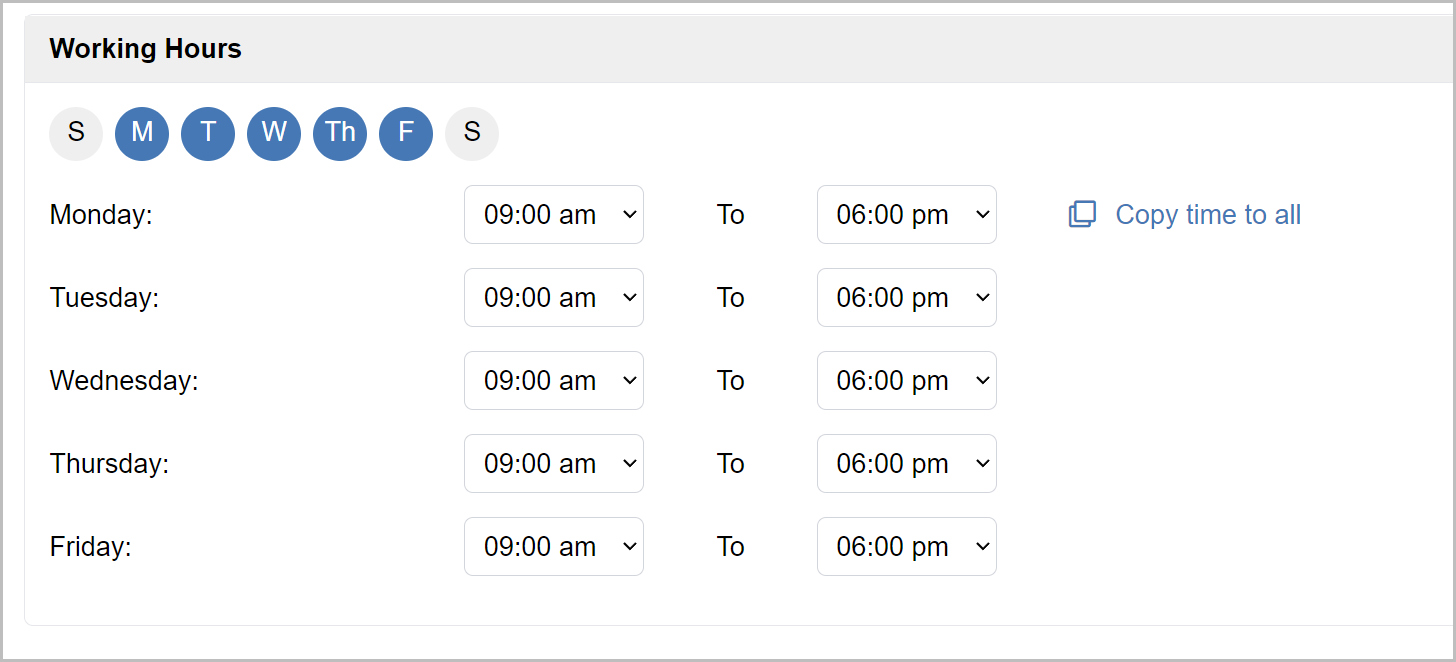
- Use the bubbles at the top of the *Working Hours* section to set your standard daily availability
- Set your standard daily working hours by selecting the appropriate time from the drop-down menus for each day. Alternatively, you can set the first one and click the **Copy time to all** button to quickly set that time for all
Want to know more about your Talentcare account settings? Learn more here: **[Managing your Account Settings](https://learn.talentcare.com/knowledge/managing-your-account-settings?hsLang=en)**
For questions, comments, or issues, **[please contact us!](https://learn.talentcare.com/knowledge/kb-tickets/new?hsLang=en)**
---
Want to provide more feedback about this article? **[Submit Feedback Here!](https://share.hsforms.com/1R4nS7T8rQ0iGUempWRhOsgcj6nq)**
- [Platform Setup and Navigation](https://learn.talentcare.com/knowledge/platform-setup-and-navigation?hsLang=en#main-content)
- [Account Setup](https://learn.talentcare.com/knowledge/platform-setup-and-navigation?hsLang=en#account-setup)
- [ATS Features and Navigation](https://learn.talentcare.com/knowledge/platform-setup-and-navigation?hsLang=en#ats-features-and-navigation)
- [User Management](https://learn.talentcare.com/knowledge/platform-setup-and-navigation?hsLang=en#user-management)
- [Knowledge Base and Helpdesk Support](https://learn.talentcare.com/knowledge/platform-setup-and-navigation?hsLang=en#knowledge-base-and-helpdesk-support)
- [Open and Manage Jobs](https://learn.talentcare.com/knowledge/open-and-manage-jobs?hsLang=en#main-content)
- [Jobs](https://learn.talentcare.com/knowledge/open-and-manage-jobs?hsLang=en#jobs)
- [Requisitions](https://learn.talentcare.com/knowledge/open-and-manage-jobs?hsLang=en#requisitions)
- [Company](https://learn.talentcare.com/knowledge/open-and-manage-jobs?hsLang=en#company)
- [Candidate Management](https://learn.talentcare.com/knowledge/candidate-management?hsLang=en#main-content)
- [Candidate Experience](https://learn.talentcare.com/knowledge/candidate-management?hsLang=en#candidate-experience)
- [Candidate Engagement](https://learn.talentcare.com/knowledge/candidate-management?hsLang=en#candidate-engagement)
- [Candidate Management](https://learn.talentcare.com/knowledge/candidate-management?hsLang=en#candidate-management)
- [Templates and Hiring Tools](https://learn.talentcare.com/knowledge/templates-and-hiring-tools?hsLang=en#main-content)
- [Job Templates](https://learn.talentcare.com/knowledge/templates-and-hiring-tools?hsLang=en#job-templates)
- [Offer Letters](https://learn.talentcare.com/knowledge/templates-and-hiring-tools?hsLang=en#offer-letters)
- [Screening and Hiring Tools](https://learn.talentcare.com/knowledge/templates-and-hiring-tools?hsLang=en#screening-and-hiring-tools)
- [Third Party Services and Solutions](https://learn.talentcare.com/knowledge/third-party-services-and-solutions?hsLang=en#main-content)
- [Indeed Job Distribution](https://learn.talentcare.com/knowledge/third-party-services-and-solutions?hsLang=en#indeed-job-distribution)
- [Third Party Configuration](https://learn.talentcare.com/knowledge/third-party-services-and-solutions?hsLang=en#third-party-configuration)
- [HRIS Integrations](https://learn.talentcare.com/knowledge/third-party-services-and-solutions?hsLang=en#hris-integrations)
- [Job Data Feed Integrations](https://learn.talentcare.com/knowledge/third-party-services-and-solutions?hsLang=en#job-data-feed-integrations)
- [Other Integrations](https://learn.talentcare.com/knowledge/third-party-services-and-solutions?hsLang=en#other-integrations)
- [Reports](https://learn.talentcare.com/knowledge/reports?hsLang=en#main-content)
- [Getting Started](https://learn.talentcare.com/knowledge/reports?hsLang=en#getting-started)
- [Report Details](https://learn.talentcare.com/knowledge/reports?hsLang=en#report-details)
- [Report Features](https://learn.talentcare.com/knowledge/reports?hsLang=en#report-features)
- [Talentcare Report](https://learn.talentcare.com/knowledge/reports?hsLang=en#talentcare-report)
- [Talentcare SFTP](https://learn.talentcare.com/knowledge/reports?hsLang=en#talentcare-sftp)
- [Recruitment Marketing Management](https://learn.talentcare.com/knowledge/recruitment-marketing-management?hsLang=en#main-content)
- [Job Advertising](https://learn.talentcare.com/knowledge/recruitment-marketing-management?hsLang=en#job-advertising)
- [Employer Branding and Reputation Management](https://learn.talentcare.com/knowledge/employer-branding-and-reputation-management?hsLang=en#main-content)
- [Reputation Management](https://learn.talentcare.com/knowledge/employer-branding-and-reputation-management?hsLang=en#reputation-management)
- [Advanced Features](https://learn.talentcare.com/knowledge/advanced-features?hsLang=en#main-content)
- [Partnership Features](https://learn.talentcare.com/knowledge/advanced-features?hsLang=en#partnership-features)
- [Additional Training](https://learn.talentcare.com/knowledge/additional-training?hsLang=en#main-content)
- [Training Videos](https://learn.talentcare.com/knowledge/additional-training?hsLang=en#training-videos)
[](https://talentcare.com)
Talentcare Knowledge Base
[mailto:email@email.com](mailto:email@email.com)
Copyright © 2026, www.talentcare.com