---
title: Open a New Job
description: Follow the steps below to open a new job in our ATS.
---
[Skip to content](https://learn.talentcare.com/knowledge/submit-a-job-requisition#main-content)
English
Show submenu for translations
[Submit a Support Ticket](https://learn.talentcare.com/knowledge/kb-tickets/new?hsLang=en)

- [Support Ticket](https://learn.talentcare.com/knowledge/kb-tickets/new)
- [Go to Knowledge Base](https://learn.talentcare.com/knowledge)
- [Sign out](https://learn.talentcare.com/_hcms/mem/logout)
Open main navigation
Close main navigation
- [Support Ticket](https://learn.talentcare.com/knowledge/kb-tickets/new)
- [Go to Knowledge Base](https://learn.talentcare.com/knowledge)
- [Sign out](https://learn.talentcare.com/_hcms/mem/logout)
- English
Show submenu for translations
- [Submit a Support Ticket](https://learn.talentcare.com/knowledge/kb-tickets/new)
- Visit Talentcare
Visit Talentcare
Hello. How can we help you?
- There are no suggestions because the search field is empty.
1. [Knowledge Base](https://learn.talentcare.com/knowledge?hsLang=en)
2. [Open and Manage Jobs](https://learn.talentcare.com/knowledge/open-and-manage-jobs?hsLang=en)
3. [Jobs](https://learn.talentcare.com/knowledge/open-and-manage-jobs?hsLang=en#jobs)
# Open a New Job
## Follow the steps below to open a new job in the Talentcare ATS Note: This article is most applicable to those who are involved in overseeing the full life cycle of a candidate in the ATS. Intended Article Audience: Hiring Manager, Recruiter, HR Administrator
### Open a New Job
- Click the **Home (blue house) **button in the top-left corner of the screen
- Select the company Company/Brand for which you desire to open a new job. Be sure that it says snapshot next to home before proceeding to the next step.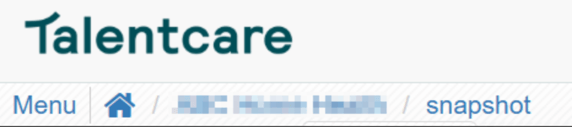
- Select the *Requisition* tab at the top-right of the screen
- Click the **New Job Opening** button in the top-right corner of the Requisitions page. This will open a pop-up window
### Submit a Requisition from the Open Job
You can also submit a new requisition for an open job. Doing so allows you to increase your requisitions for a specific job.
- Locate the job you'd like to add a new requisition to
- From the *Hiring Needs* tab, click the **+ New Requisition** button to the right of the screen

Learn more about increasing your requisitions here: [**Increase and Decrease a Requisition**](https://learn.talentcare.com/knowledge/increase-or-decrease-a-requisition?hsLang=en)
#### General Information
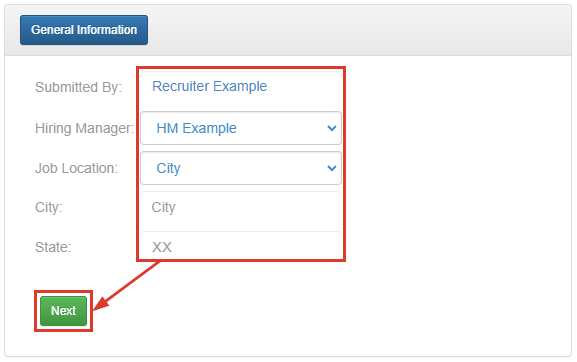
Complete the *General Information *section, then click the **Next **button.
- Hiring Manager - Select the hiring manager for the requisition. Note: If the desired hiring manager does not appear in the drop down list, check if that person exists in the Contacts tab and that they have the required permissions.
- Job Location - Select the location for the job
- City - This should be automatically filled based on Job Location
- State - This should be automatically filled based on Job Location
#### Job Details
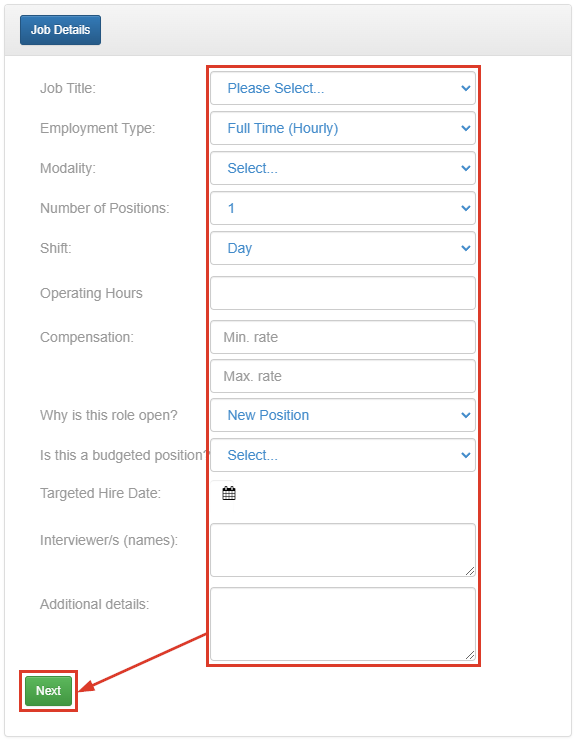
Complete the *Job Details* section, then click **Next.**
- *Job Title* - Title of the job
Adding a new requisition from the Job page will automatically fill in the *Job Title *section with the appropriate job template!
- *Employment Type* - Select the type of employment that defines this job
- *Modality *- Is this role remote, on site, or hybrid
- *Number of Positions* - How many positions are available for this job
- *Shift* - Select the type of shift that defines this job
- *Compensation* - Enter the minimum and maximum rates of compensation for this job
- *Why is the role open?* - Is the role a new position or replacement
- *Is this a budgeted position?* - Answer whether the position is budgeted
- *Target Hire Date* - Use the calendar to set a target date of hire
- *Additional Details* - Enter any additional information pertaining to this job/requisition
#### Job Distribution
- Choose the desired setting from the *Job Distribution* section, then click **Submit**
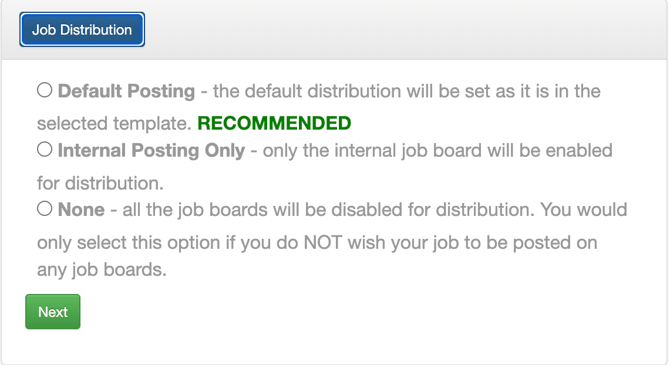
The option chosen will determine how the Distribution tab looks

### Next Steps
Once your new job is submitted, you can find it listed under the *Pending *tab. It will remain there until the requisition is approved. Once approved, the requisition moves to the *Active* tab until it is no longer active.
### Additional Information and Updates
#### Opening an Internal Job
This feature requires the use of an internal job feed for an employee access only job board. Without having an internal job board, this feature will have no effect.
If you wish to utilize this feature, please reach out to your client team
#### Requisition Location Change
The requisitions for a job will no longer be shown on the Candidates tab
They will now be shown separately in their own tab that will be called Hiring Needs
The number shown next to the title is the number of unfilled open positions available across all requisitions

#### Candidate Indicators
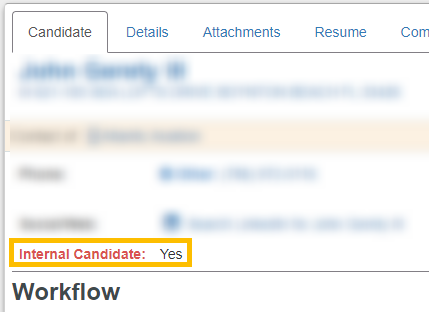
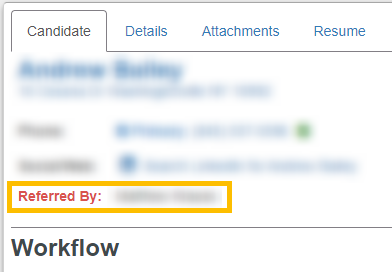
The candidate cards will now indicate if that candidate is either an internal candidate or a referral candidate
- Internal candidates will be marked with "IN"
- Referral candidates will be marked with "RF"
- External candidates will have no marking

Candidate page
- This information will also be shown on the candidate's page
| **Internal Candidate** | **Referral Candidate** |
| --- | --- |
|  |  |
**There are two ways a candidate can be marked as internal**
1. They apply for the position using the company's internal job board
2. They answer:
| - the application question "Are you a current employee of (Company Name)?" with *Yes * | 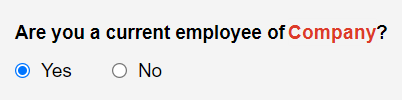 |
| --- | --- |
| - choose *Confirm* from the pop up window | 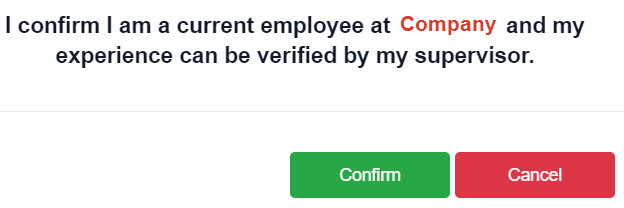 |
| - and enter the name of their supervisor | 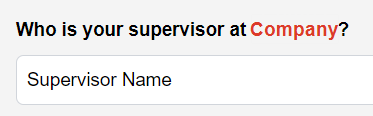 |
For questions, comments, or issues, **[please contact us!](https://learn.talentcare.com/knowledge/kb-tickets/new?hsLang=en)**
- [Platform Setup and Navigation](https://learn.talentcare.com/knowledge/platform-setup-and-navigation?hsLang=en#main-content)
- [Account Setup](https://learn.talentcare.com/knowledge/platform-setup-and-navigation?hsLang=en#account-setup)
- [ATS Features and Navigation](https://learn.talentcare.com/knowledge/platform-setup-and-navigation?hsLang=en#ats-features-and-navigation)
- [User Management](https://learn.talentcare.com/knowledge/platform-setup-and-navigation?hsLang=en#user-management)
- [Knowledge Base and Helpdesk Support](https://learn.talentcare.com/knowledge/platform-setup-and-navigation?hsLang=en#knowledge-base-and-helpdesk-support)
- [Open and Manage Jobs](https://learn.talentcare.com/knowledge/open-and-manage-jobs?hsLang=en#main-content)
- [Jobs](https://learn.talentcare.com/knowledge/open-and-manage-jobs?hsLang=en#jobs)
- [Requisitions](https://learn.talentcare.com/knowledge/open-and-manage-jobs?hsLang=en#requisitions)
- [Company](https://learn.talentcare.com/knowledge/open-and-manage-jobs?hsLang=en#company)
- [Candidate Management](https://learn.talentcare.com/knowledge/candidate-management?hsLang=en#main-content)
- [Candidate Experience](https://learn.talentcare.com/knowledge/candidate-management?hsLang=en#candidate-experience)
- [Candidate Engagement](https://learn.talentcare.com/knowledge/candidate-management?hsLang=en#candidate-engagement)
- [Candidate Management](https://learn.talentcare.com/knowledge/candidate-management?hsLang=en#candidate-management)
- [Templates and Hiring Tools](https://learn.talentcare.com/knowledge/templates-and-hiring-tools?hsLang=en#main-content)
- [Job Templates](https://learn.talentcare.com/knowledge/templates-and-hiring-tools?hsLang=en#job-templates)
- [Offer Letters](https://learn.talentcare.com/knowledge/templates-and-hiring-tools?hsLang=en#offer-letters)
- [Screening and Hiring Tools](https://learn.talentcare.com/knowledge/templates-and-hiring-tools?hsLang=en#screening-and-hiring-tools)
- [Third Party Services and Solutions](https://learn.talentcare.com/knowledge/third-party-services-and-solutions?hsLang=en#main-content)
- [Indeed Job Distribution](https://learn.talentcare.com/knowledge/third-party-services-and-solutions?hsLang=en#indeed-job-distribution)
- [Third Party Configuration](https://learn.talentcare.com/knowledge/third-party-services-and-solutions?hsLang=en#third-party-configuration)
- [HRIS Integrations](https://learn.talentcare.com/knowledge/third-party-services-and-solutions?hsLang=en#hris-integrations)
- [Job Data Feed Integrations](https://learn.talentcare.com/knowledge/third-party-services-and-solutions?hsLang=en#job-data-feed-integrations)
- [Other Integrations](https://learn.talentcare.com/knowledge/third-party-services-and-solutions?hsLang=en#other-integrations)
- [Reports](https://learn.talentcare.com/knowledge/reports?hsLang=en#main-content)
- [Getting Started](https://learn.talentcare.com/knowledge/reports?hsLang=en#getting-started)
- [Report Details](https://learn.talentcare.com/knowledge/reports?hsLang=en#report-details)
- [Report Features](https://learn.talentcare.com/knowledge/reports?hsLang=en#report-features)
- [Talentcare Report](https://learn.talentcare.com/knowledge/reports?hsLang=en#talentcare-report)
- [Talentcare SFTP](https://learn.talentcare.com/knowledge/reports?hsLang=en#talentcare-sftp)
- [Recruitment Marketing Management](https://learn.talentcare.com/knowledge/recruitment-marketing-management?hsLang=en#main-content)
- [Job Advertising](https://learn.talentcare.com/knowledge/recruitment-marketing-management?hsLang=en#job-advertising)
- [Employer Branding and Reputation Management](https://learn.talentcare.com/knowledge/employer-branding-and-reputation-management?hsLang=en#main-content)
- [Reputation Management](https://learn.talentcare.com/knowledge/employer-branding-and-reputation-management?hsLang=en#reputation-management)
- [Advanced Features](https://learn.talentcare.com/knowledge/advanced-features?hsLang=en#main-content)
- [Partnership Features](https://learn.talentcare.com/knowledge/advanced-features?hsLang=en#partnership-features)
- [Additional Training](https://learn.talentcare.com/knowledge/additional-training?hsLang=en#main-content)
- [Training Videos](https://learn.talentcare.com/knowledge/additional-training?hsLang=en#training-videos)
[](https://talentcare.com)
Talentcare Knowledge Base
[mailto:email@email.com](mailto:email@email.com)
Copyright © 2026, www.talentcare.com