---
title: Online Phone Number Setup and Configuration
description: This guide features the steps for setting up and configuring your Online Phone number in the ATS.
---
[Skip to content](https://learn.talentcare.com/knowledge/online-phone-number-setup-and-configuration#main-content)
English
Show submenu for translations
[Submit a Support Ticket](https://learn.talentcare.com/knowledge/kb-tickets/new?hsLang=en)

- [Support Ticket](https://learn.talentcare.com/knowledge/kb-tickets/new)
- [Go to Knowledge Base](https://learn.talentcare.com/knowledge)
- [Sign out](https://learn.talentcare.com/_hcms/mem/logout)
Open main navigation
Close main navigation
- [Support Ticket](https://learn.talentcare.com/knowledge/kb-tickets/new)
- [Go to Knowledge Base](https://learn.talentcare.com/knowledge)
- [Sign out](https://learn.talentcare.com/_hcms/mem/logout)
- English
Show submenu for translations
- [Submit a Support Ticket](https://learn.talentcare.com/knowledge/kb-tickets/new)
- Visit Talentcare
Visit Talentcare
Hello. How can we help you?
- There are no suggestions because the search field is empty.
1. [Knowledge Base](https://learn.talentcare.com/knowledge?hsLang=en)
2. [Platform Setup and Navigation](https://learn.talentcare.com/knowledge/platform-setup-and-navigation?hsLang=en)
3. [Account Setup](https://learn.talentcare.com/knowledge/platform-setup-and-navigation?hsLang=en#account-setup)
# Online Phone Number Setup and Configuration
## This guide outlines the steps for setting up and configuring your Online Phone number in the Talentcare ATS. This article is most applicable to user's whose main responsibilities include candidate outreach and scheduling. Intended Article Audience: Recruiter, Hiring Manager
### Initial Setup
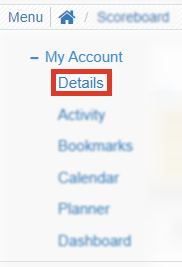
- In the Talentcare Platform, locate your Online Phone settings by clicking
Menu \> My Account \> Details
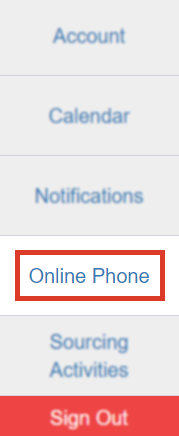
- From your Account Details, click *Online Phone*
- Green plus is now Green ***Request New Phone Number*** button

- When selected a new disclaimer is shown in the modal
- *Please choose the State and Area Code of the number you wish to request. Activation can take up to one business day, although it is usually within 30-60 minutes.*
**
### Forwarding Setup
- In the *Forwarding To:* section, enter your personal or work phone number
- Click the toggle button to *Enable SMS Forwarding*
### Remove Online Phone Number
Once your phone number is removed, you will not be able to use that phone number again!
- In the Talentcare Platform, locate your Online Phone settings by clicking
Menu \> My Account \> Account Settings \> Online Phone
- Locate your Online Phone Number and click the Red ***Release Number*** button to remove the number
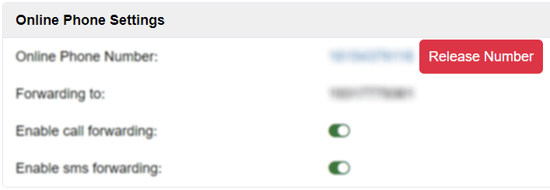
- When prompted, confirm that you are certain you would like to remove your phone number. If so, click ***Release***
****
If you receive any errors when attempting to remove your phone number, **[submit a ticket for technical support](https://learn.talentcare.com/knowledge/kb-tickets/new?hsLang=en)**
### No Online Phone Number Error
- If you attempt to contact a candidate without first setting up a Online Phone number, this error message will occur

- If this happens, follow the initial setup above to get a number
### Notification Management
You can find the Notifications settings by selecting the *Notifications* tab in Account Settings, or by going through
Menu \> My Account \> Account Settings \> Notifications
#### **Check unread SMS interval**
Modify how often the system checks for unread SMS messages. This interval is measured in minutes.
- To change this interval, click the default 1 minute interval
- Enter the number of minutes you’d like the system to check for unread SMS messages
There is no limit to the number of minutes, but it is recommended not to enter more than 60 (1 hour)
- Click the **Blue Check** to save changes, or the **Gray 'X'** to delete changes
#### **SMS refresh interval**
The SMS refresh interval dictates how often your SMS message logs are refreshed. This interval is measured in seconds.
- To change this interval, click the default 3600 second interval
- Enter the number of seconds you’d like the system to refresh your SMS logs
- Click the **Blue Check** to save changes, or the **Gray 'X'** to delete changes
#### **Enable SMS notification**
This setting allows you to enable SMS notifications to start receiving based on the parameters of the check SMS and refresh intervals.
- By default, this setting is disabled. Enable SMS notification by clicking the **toggle button**
- Once the button turns green, you will begin receiving SMS notifications
#### **Send daily summary of new candidates email alert**
If this setting is enabled, you will receive a summary of all new candidates.
- This summary is delivered via email every day
#### **Send new candidate email alert**
If this setting is enabled, you will receive an alert for every new candidate.
- This alert is sent via email every time a new candidate applies for a job
*For questions, comments, or issues, **[please contact us!](https://learn.talentcare.com/knowledge/kb-tickets/new?hsLang=en)***
- [Platform Setup and Navigation](https://learn.talentcare.com/knowledge/platform-setup-and-navigation?hsLang=en#main-content)
- [Account Setup](https://learn.talentcare.com/knowledge/platform-setup-and-navigation?hsLang=en#account-setup)
- [ATS Features and Navigation](https://learn.talentcare.com/knowledge/platform-setup-and-navigation?hsLang=en#ats-features-and-navigation)
- [User Management](https://learn.talentcare.com/knowledge/platform-setup-and-navigation?hsLang=en#user-management)
- [Knowledge Base and Helpdesk Support](https://learn.talentcare.com/knowledge/platform-setup-and-navigation?hsLang=en#knowledge-base-and-helpdesk-support)
- [Open and Manage Jobs](https://learn.talentcare.com/knowledge/open-and-manage-jobs?hsLang=en#main-content)
- [Jobs](https://learn.talentcare.com/knowledge/open-and-manage-jobs?hsLang=en#jobs)
- [Requisitions](https://learn.talentcare.com/knowledge/open-and-manage-jobs?hsLang=en#requisitions)
- [Company](https://learn.talentcare.com/knowledge/open-and-manage-jobs?hsLang=en#company)
- [Candidate Management](https://learn.talentcare.com/knowledge/candidate-management?hsLang=en#main-content)
- [Candidate Experience](https://learn.talentcare.com/knowledge/candidate-management?hsLang=en#candidate-experience)
- [Candidate Engagement](https://learn.talentcare.com/knowledge/candidate-management?hsLang=en#candidate-engagement)
- [Candidate Management](https://learn.talentcare.com/knowledge/candidate-management?hsLang=en#candidate-management)
- [Templates and Hiring Tools](https://learn.talentcare.com/knowledge/templates-and-hiring-tools?hsLang=en#main-content)
- [Job Templates](https://learn.talentcare.com/knowledge/templates-and-hiring-tools?hsLang=en#job-templates)
- [Offer Letters](https://learn.talentcare.com/knowledge/templates-and-hiring-tools?hsLang=en#offer-letters)
- [Screening and Hiring Tools](https://learn.talentcare.com/knowledge/templates-and-hiring-tools?hsLang=en#screening-and-hiring-tools)
- [Third Party Services and Solutions](https://learn.talentcare.com/knowledge/third-party-services-and-solutions?hsLang=en#main-content)
- [Indeed Job Distribution](https://learn.talentcare.com/knowledge/third-party-services-and-solutions?hsLang=en#indeed-job-distribution)
- [Third Party Configuration](https://learn.talentcare.com/knowledge/third-party-services-and-solutions?hsLang=en#third-party-configuration)
- [HRIS Integrations](https://learn.talentcare.com/knowledge/third-party-services-and-solutions?hsLang=en#hris-integrations)
- [Job Data Feed Integrations](https://learn.talentcare.com/knowledge/third-party-services-and-solutions?hsLang=en#job-data-feed-integrations)
- [Other Integrations](https://learn.talentcare.com/knowledge/third-party-services-and-solutions?hsLang=en#other-integrations)
- [Reports](https://learn.talentcare.com/knowledge/reports?hsLang=en#main-content)
- [Getting Started](https://learn.talentcare.com/knowledge/reports?hsLang=en#getting-started)
- [Report Details](https://learn.talentcare.com/knowledge/reports?hsLang=en#report-details)
- [Report Features](https://learn.talentcare.com/knowledge/reports?hsLang=en#report-features)
- [Talentcare Report](https://learn.talentcare.com/knowledge/reports?hsLang=en#talentcare-report)
- [Talentcare SFTP](https://learn.talentcare.com/knowledge/reports?hsLang=en#talentcare-sftp)
- [Recruitment Marketing Management](https://learn.talentcare.com/knowledge/recruitment-marketing-management?hsLang=en#main-content)
- [Job Advertising](https://learn.talentcare.com/knowledge/recruitment-marketing-management?hsLang=en#job-advertising)
- [Employer Branding and Reputation Management](https://learn.talentcare.com/knowledge/employer-branding-and-reputation-management?hsLang=en#main-content)
- [Reputation Management](https://learn.talentcare.com/knowledge/employer-branding-and-reputation-management?hsLang=en#reputation-management)
- [Advanced Features](https://learn.talentcare.com/knowledge/advanced-features?hsLang=en#main-content)
- [Partnership Features](https://learn.talentcare.com/knowledge/advanced-features?hsLang=en#partnership-features)
- [Additional Training](https://learn.talentcare.com/knowledge/additional-training?hsLang=en#main-content)
- [Training Videos](https://learn.talentcare.com/knowledge/additional-training?hsLang=en#training-videos)
[](https://talentcare.com)
Talentcare Knowledge Base
[mailto:email@email.com](mailto:email@email.com)
Copyright © 2026, www.talentcare.com